You Kill Me

This is the story of a man while drying out on the West Coast, an alcoholic hit man befriends a tart-tongued woman who might just come in handy when it's time for him to return to Buffalo and settle some old scores.

Download SP Flash Tool V5.1648.00.000 Latest Version


SP flash tool is a smart and user friendly tool designed for MediaTek devices. Android Smartphone Flash tool supports flash stock, installing custom recovery and firmware updates. SPFlash tool is very supportive when you Flash stock ROM,unbrick or installing custom recovery for your Mediatek devices.

If you are using the scatter SP Flash is very much easy to use with CWM and appropriate software and driver installation. Download Smart Phone Flash Tool for Windows and Linux OS. SmartPhone Flash tool is for MTK devices,compatible with both 32 and 64 bit version.

Recommended:
HOW TO USE SP FLASH TOOL
DOWNLOAD MTK STOCK ROM

SP Flash Latest Change Logs [V5.1648.00.000]
Flash custom ROM
Android stock ROM flashing (Scatter based)
Fixes bricked devices
Advanced testing and verifying memory
Reset, format and erase MTK device
Write, read parameters etc.

Requirements For SP FlashTool
Pc or Laptop
USB data cable for your device
Drivers (MediaTek USB VCOM drivers ). You can see above tutorial and download links
Scatter file + files to be flashed


SP Flash Tool Features.

Flash Stock Rom:
It allows you to flash scatter based firmware on android device (MTK based). It also allows you to downgrade or upgrade your device firmware in few clicks.
Flash Recovery:
It allows you to flash custom recovery to your MTK based device. Simply, add the scatter file in the SP Flash tool and locate the recovery.img image and flash it.
Memory Test:
It allows users to check and verify the RAM on external memory and the NAND Flash on the device.
Parameter Setting:
It allows users to read and write the parameter on device devices. For Example, users can easily read and write functions data for One time programming (OTP) area.
Format Device / Hard Reset:
It allows users to format Android Smartphone running on the MediaTek Chipset. Simply load the Scatter file and connect your smartphone to the computer and press on Format.

Download SP Flash Tool V5.1648.00.000 Latest  Version 2017
SP_Flash_Tool_exe_Windows_v5.1648.00.000

Download Samsung ADB ENABLE FILES [ 2017 FRP SOLUTION ]

How to Remove SAMSUNG FRP via ADB Command

What is FRP?
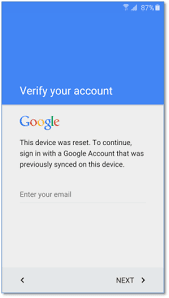
Factory Reset Protection (FRP) is a security method that was designed to make sure someone can't just wipe and factory reset your phone if you've lost it or it was stolen. Starting with Android Lollipop, FRP is "standard" in vanilla Android, and most companies making our phones have implemented it in their own models.


Recommended:


How to Remove SAMSUNG FRP via ADB Command

Download ADB Enable Files Below
 this files is .tar file extension so Flash uisng Odin Tool
learn how to flash Samsung .tar file from here
After downloaded, Now yours Mobile ADB Enabled 
You can now RUN the follow Commands through ADB Terminal.

adb shell content insert --uri content://settings/secure --bind name:s:user_setup_complete --bind value:s:1
Note: if this commands Not work for you Try below commands

adb shell am start -n com.google.android.gsf.login.LoginActivity
adb shell am start -n com.google.android.gsf.login/

Congratulation You have Successfully Removed FRP using ADB Terminal . If all commands not working then comment on this post. I will give you any other solution for removing your FRP.

Download Samsung ADB ENABLE FILES


Samsung Galaxy A7 A710Y ADB Enable file


Samsung Galaxy A9 A910F ADB Enable File 


Samsung Galaxy Metro SM-B350E ADB Eanble File


Samsung Galaxy G120F SM-G120F ADB Enable File


Samsung Galaxy A3 SM-A310F ADB Enable FIle 


Samsung Galaxy A5 SM-A510F ADB Enable File


Samsung Galaxy A510Y ADB Enable File


Samsung Galaxy A7 SM-A710F ADB Enable FIle


Samsung Galaxy Xcover 3 SM-G398F ADB Enable File


Samsung Galaxy G510G SM-G510G ADb Enable File


Samsung Galaxy On7 SM-G600F ADB Enable File 


Samsung Galaxy S5 Neo SM-G903F ADB Enable FIle


Samsung Galaxy S6 SM-G920P ADB Enable File


Samsung Galaxy S6 Edge+ SM-G928F ADb Enable File


Samsung Galaxy S6 Edge+ SM-G928G ADb Enable File


Samsung Galaxy S7 SM-G930F ADB Enable File


Samsung Galaxy S7 Edge SM-G935F ADB Enable File


Samsung Galaxy J1 NXT SM-J105 ADB Enable File


Samsung Galaxy J1 Mini SM-J105H ADB Enable File


Samsung Galaxy J1 (2016) SM-J120F ADB Enable File


Samsung Galaxy J2 SM-J200H ADB Enable File 


Samsung Galaxy J5 (2016) SM-J510H ADB Enable File


Samsung Galaxy J7 SM-J700H ADB Enable File


SAMSUNG Galaxy Tab A (2016) 4G SM-T585 ADB Enable File

SAMSUNG Galaxy T677D SM-T677D ADB Enable File


SAMSUNG Galaxy Tab S2 SM-T813 ADB Enable File


Samsung Galaxy J3 (2016) SM-J320F ADB Enable File


Samsung Galaxy J3 (2016) SM-J320P ADB Enable File


Samsung Galaxy J3 (2016) SM-J320Y ADB Enable File


Samsung Galaxy J5 (2016) SM-J510F ADB Enable File


SAMSUNG Galaxy Tab S2 VE SM-T819 ADb Enable File


Samsung Galaxy J7 (2016) SM-J710F ADB Enable FIle


Samsung Galaxy J7 (2016) SM-J710G ADB Enable File


SAMSUNG Galaxy Note 7 SM-N930F ADB Enable File


SAMSUNG Galaxy Gear Fit SM-R350 ADB Enable File


SAMSUNG Galaxy SAMSUNG Galaxy Tab A (2016) SM-T580 ADB Enable File


HOW TO FIX / REPAIR BASEBAND UNKNOWN + IMEI TECNO CAMON C9


With this easy tutorial you can Fix Baseband Unknown + Invalid imei without stress on Tecno Camon C9
What is imei ?
The IMEI (International Mobile Equipment Identity) is a unique number to identify GSM, WCDMA, and iDEN mobile phones, as well as some satellite phones. TheIMEI is only used for identifying the device and has no permanent or semi-permanent relation to the subscriber.


This Method Also works on follow Phones.,

INFINIX X601
INFINIX X552
INFINIX X553
INFINIX X554
INFINIX X556
INFINIX X557
INFINIX X600
INFINIX X601
TECNO C9
TECNO C7
TECNO PHATOM 6 PLUS
TECNO W4
TECNO W3
TECNO W5
TECNO W2
TECNO J8
TECNO L6
TECNO C7
GIONEE 
E.T.C.

HOW TO FIX / REPAIR BASEBAND UNKNOWN + IMEI TECNO CAMON C9
Steps:


  • Download an Flash Tecno Camon C9 Stock ROM from here
  • After flash successful
  • Make A Factory Reset In Settings=>
  • Open Miracle Box Tick On Fix Unknown Baseband download miracle box From here [optional] 
screenshot below


  • After fixed, Remove the battery and reboot the phone {1st boot takes While]
  •  Finally Goto settings=>  Again and make A Factory Reset.Done.

Underworld blood wars

Vampire death dealer, Selene (Kate Beckinsale) fights to end the eternal war between the Lycan clan and the Vampire faction that betrayed her.

Assassin Creed

base onf a true Muslim killing base when islamis try to kill suni with there power one man fight against the leader of Muslim for a long time less ... after this this procedure which is call assassination become popular and many of movies and many games where introduce ever after .....
Origin: USA, UK, France
Year: 2016
Directors: Justin Kurzel
Genres: Action, Adventure, History, Sci-Fi
Stars: Michael Fassbender, Marion Cotillard, Jeremy Irons, Brendan Gleeson, Michael Kenneth Williams
When Callum Lynch
Watch in SD

Download SOLO Aspire 3 Firmware

SOLO Aspire 3 Firmware


Below is the direct link to download the Solo Aspire 3 Firmware stock ROM (flash file) this Firmware contains Flash Tool, Driver and instructions.
Take a Backup of your personal data before flashing or installing the firmware on your smartphone.
As this helps you to recover the personal data whenever any thing wrong happen.

SOLO Aspire 3 Firmware Specifications. File To Flash [ stock ROM]

Technology
GSM: GSM 850 / 900 / 1800 / 1900
3G: HSDPA 850 / 2100
4G: No
SIM Type: Micro SIM

OS:
 Android 5.1 Lollipop
Design
Dimensions: 144.3 x 73.1 x 9.8 mm

Weight:
Display: 5.0 inches, 540 x 960 pixels, IPS display
Sensors: Accelerometer, Proximity
Build: Plastic
Colours: Warm Silver. Soft Gold.

Hardware
Processor Type: Quad-core 1.2 GHz Cortex-A53
Processor Name: Qualcomm MSM8916 Snapdragon 410
Graphics Processor:
RAM: 1 GB
Internal Storage: 8 GB
External Storage: MicroSD card up to 32 GB

Camera
Rear: 8 megapixel autofocus camera with LED flash
Video recording: Yes
Front-facing: 5 megapixel camera

Multimedia
Music Support: mp3, aac, aac+, eaac+, amr
Loudspeaker: Mono
Video Support: mpeg4, h.263, h.264
FM Radio:
SOLO Music/SOLO View: Unlimited access to 20,000+ songs and movies

Connectivity
Bluetooth: Yes
WiFi: Wi-Fi 802.11 b/g/n, Wi-Fi Direct, hotspot
GPS: Yes
USB: microUSB
Miscellaneous
Battery: 2000 mAh


You Might Also Like:

All Solo Firmware Link here
Download SP flash Tool From here
Download Spreadtrum Flashing Tool from Here

HOW TO FLASH SOLO ASPIRE 3?

Download and extract the stock firmware on your computer.
After extracting you will find the SP Flash Tool, Driver and instruction manual.
Install the USB Drivers (skip if drivers are already installed).
Open the SP Flash Tool and load the Scatter File from the firmware folder.
Connect your Smartphone to the computer using the USB Driver.
Click on Upgrade / Download Button in the SP Flash Tool to Begin the Flashing.
Green Ring will appear at the end of successful Flash.
See Detailed instruction with images On how to Use sp Flash Tool

Recommended:
Learn How to Flash Mediatek device From Here
Download more Mediatek Firmware from here

SOLO Aspire 3 Firmware  / Stock ROM
Aspire3.fwvga.64+8.b1b8_app_V004_20161031
Android 6.0
MT6580